 Presly
Your posts, your messages, your bookings. One app.
Presly writes your posts and publishes them to 10 platforms. Customers book from your Instagram bio, your Google profile, or a QR code at the door, and you accept, offer another time, or decline.
Booking comes with Growth and Pro. Customers pay you directly. Free for 7 days, then from $39/mo. Cancel anytime before then and pay nothing.
Publishes to 10 platforms
- TikTok
- YouTube
- Threads
- Bluesky
- Google Business
- X












Choose what fits
Keep your booking app
Already use a booking app? Keep it. Presly writes and publishes your posts.
Starter, $39/mo
See plansPosts + inbox + booking
Posts on 10 platforms, every DM, comment and review in one inbox, and online booking for up to 5 bookable team members or 500 table bookings a month.
Growth, $79/mo
How online booking worksBigger team or busy dining room
Everything in Growth, with no limit on team members or table bookings.
Pro, $159/mo
See plansFree for 7 days on every plan. Customers pay you directly.
What does Presly do for a local business?
Presly is an AI social media manager for local businesses. It writes and publishes posts to 10 platforms, and on Growth and Pro it adds an inbox for comments, messages and reviews, plus online booking for appointments and table reservations. It learns the business from its website, and owners choose the posting schedule and can review, edit, pause, or replace posts. Paid plans use credits for AI-generated posts; manual posts and bookings do not use credits. Every plan is free for 7 days, and a card is required to start.
How it works. Fast.
From your website to posts on your calendar, plus one link customers can book from.
Your posts written and ready instead of hours every Sunday.

Paste your website
We scan your site to understand your services, tone of voice, colors, and audience.
Get your posts
Presly writes 30 days of on-brand posts for you — captions, images, and hashtags, all tailored to your business.

Auto-publish everywhere
Presly schedules and publishes across all 10 platforms on its own. No approval queue, no logging in — it just runs.
Share one booking link
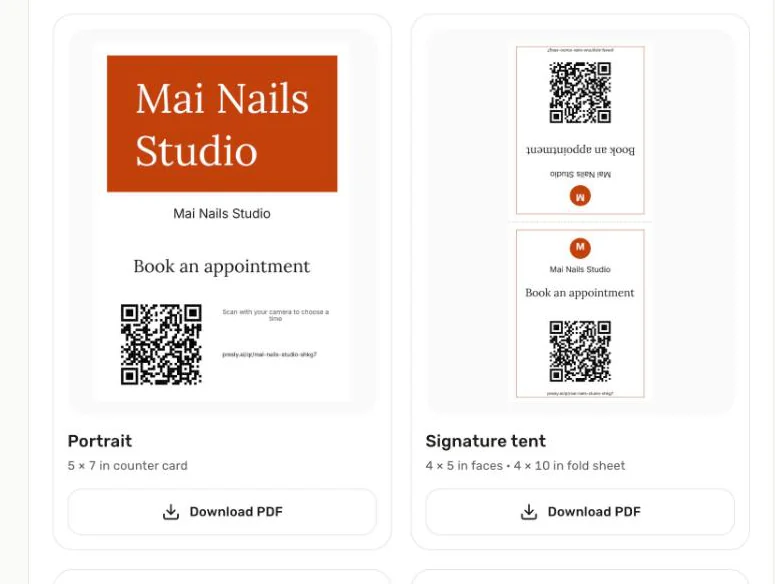
Growth and Pro give you one booking link and a printable QR code for your Instagram bio, Google profile, website, and door.
Online booking
One booking link for every place customers find you.
Put your link in your Instagram bio, on Google, and on a QR code by the register. Customers pick a time on their phone. You accept, offer another time, or decline, right inside Presly.
Appointments or tables
Customers pick a service and who they want, or Anyone. Restaurants set tables by size, the largest party, and how many guests can arrive each half hour.
You stay in charge
Every request waits for your answer. Accept it, offer another time, or decline. Prefer hands-off? Turn on Confirm automatically and open times book right away.
Customers handle the small stuff
Each customer gets a private link to change the time, cancel, or add the visit to their calendar. Confirmation and reminder emails go out for you in English, Spanish, or Vietnamese.
Your day on one screen
Today shows who needs an answer and who is coming in. The calendar shows your day, week, or month, and Customers keeps every visit and your private notes.
Setup starts from what you already have. Snap a photo of your price list or paste your menu link, and Presly fills in your services for you to check.
Online booking comes with Growth and Pro. Free for 7 days. Cancel anytime before then and pay nothing. Customers pay you directly, the way they do today. Online booking is built for salons, restaurants, pet groomers, home services, and other local businesses outside health care.
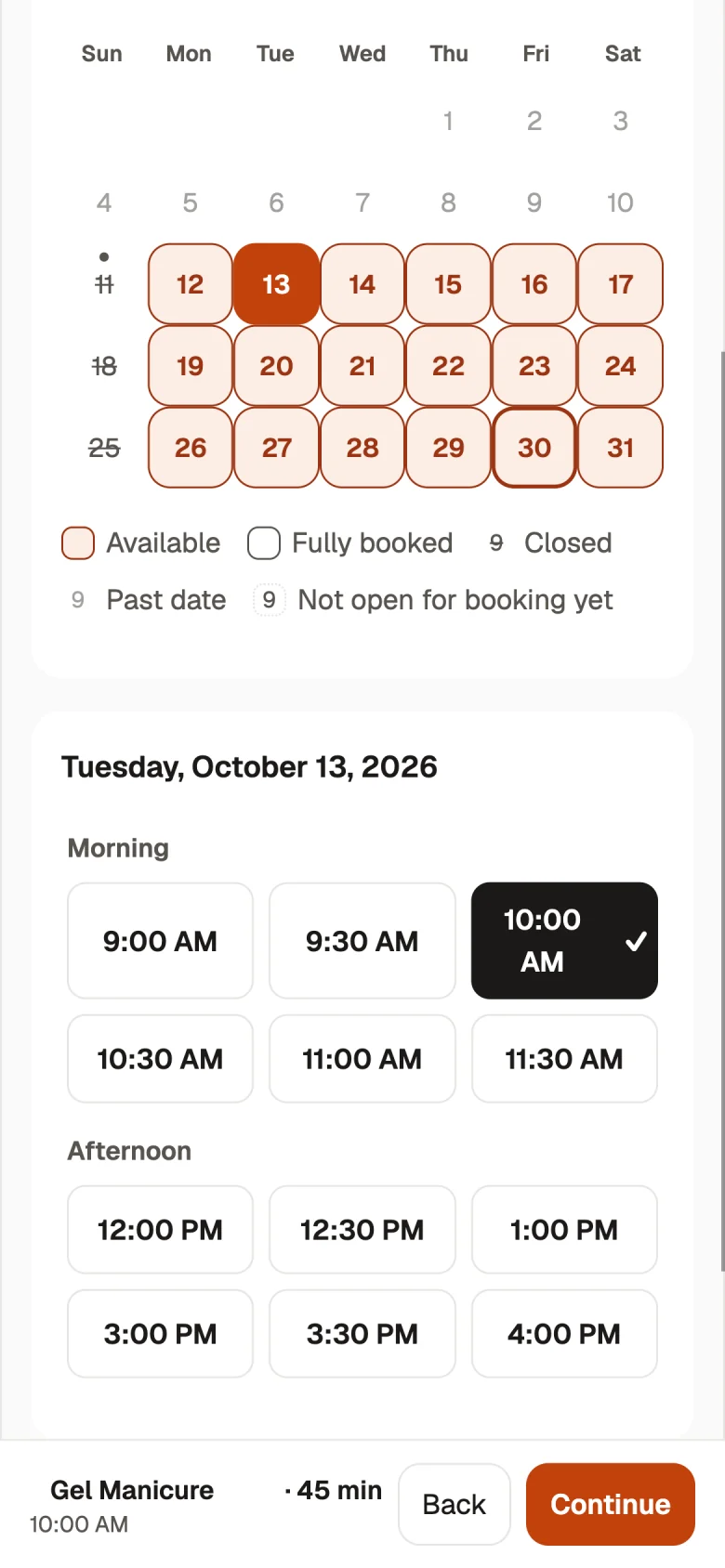
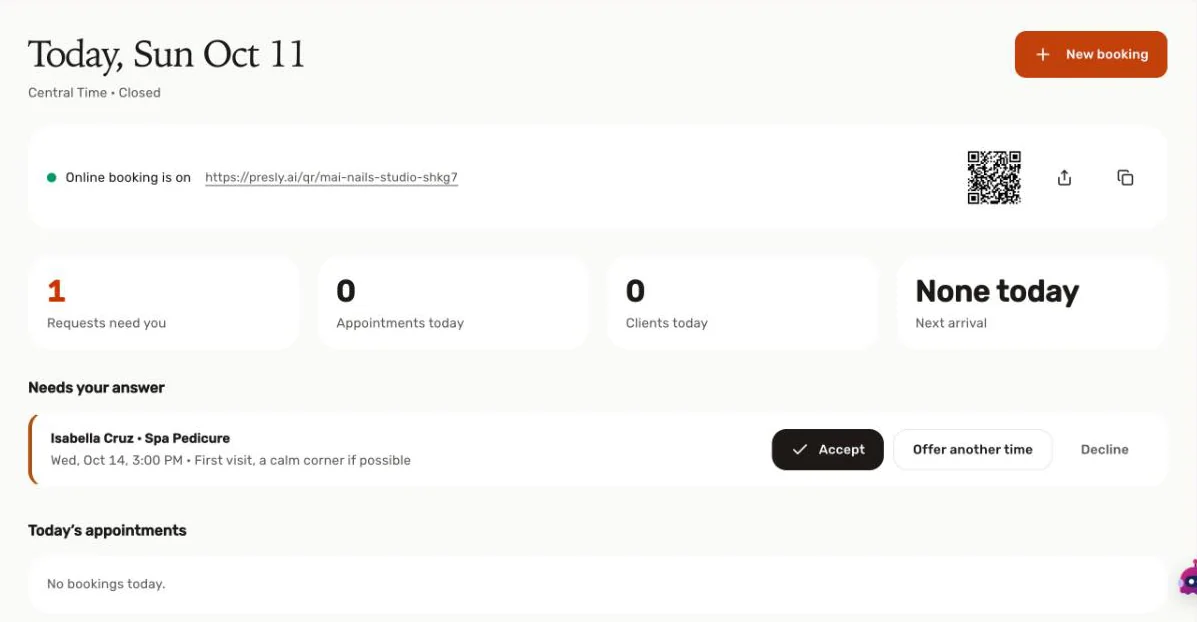
Put your booking link in your Instagram bio, on Google, and on a QR sign at the door.
Sample business shown.
Where to put your link
Instagram bio
Edit profile → Links → Add external link, then paste your booking link.
Google Business Profile
Business Profile → Edit profile → Booking, then paste your link and save it in Google.
Your website
Add it as a Book button or a link in your menu.
A sign at the door
Print the QR code as a table tent or a window poster.
Every DM, comment,
and review in one place.
Stop juggling six apps. Presly pulls every conversation from every platform into a single inbox, so you can reply to everyone from one screen and never lose a customer in the noise.
All channels, one screen
Instagram, Facebook, Google reviews, and more — no more app-switching.
Reply from one screen
Answer DMs, comments and reviews in a tap — without app-switching.
Never miss a customer
Unread counts and reminders keep you on top of every message that matters.
AI drafts your reply
Presly drafts an on-brand reply. You review it and send.





Post your videos
everywhere.
Upload the videos you already film. Presly writes the caption, picks the hashtags, and publishes to Reels, Shorts, TikTok & Stories — everywhere at once, on your schedule.
Upload your own video
Up to 5 minutes, 200MB — the clips you already have, no editing tools to learn.
Captions written for you
Presly writes a native caption and hashtags tuned to each platform.
One video, every platform
Post the same video to Reels, Shorts, TikTok & Stories in one tap.
Published on your schedule
Presly posts it at your best times — you never touch the scheduler.
Built for real people.
Not just for tech startups. Presly is used by the businesses that make neighborhoods thrive.



The owners running their
businesses, not their feeds.
Five minutes a week. Months of content. Real growth, in their own words.
"I'm in the bakery by 5:30. I used to write captions in bed at 11pm and hate every minute of it. Now it's two minutes on Sunday and I'm done. My weekends came back."

"It sounds like me, not a brand. My partner read one out loud and asked when I'd found time to write it. I hadn't — Presly did."

"Six months in, my Instagram is up 3x and I haven't touched it. Bookings are up too. End of story."

"I'm 58 and I was ready to give up on social media. My niece set this up in twenty minutes. It just runs. I don't think about it."

"Other tools made my shop sound like a chain. Presly picked up the quiet, moody thing we're about straight from my website. I didn't have to explain it."

"Haven't missed a post in four months. Before this I'd go dark for weeks every busy season. Now my regulars know what's on the bar without me lifting a finger."

Simple pricing, no surprises.
Starter
For single location businesses
Growth
For growing local brands
Pro
For multi-location & pros
Agency
For agencies
Got questions?
General
What is Presly?
Presly is an AI social media manager for local businesses. It writes and publishes posts to 10 platforms, and on Growth and Pro it adds an inbox for comments, messages and reviews, plus online booking for appointments and table reservations. It learns the business from its website, and owners choose the posting schedule and can review, edit, pause, or replace posts. Paid plans use credits for AI-generated posts; manual posts and bookings do not use credits. Every plan is free for 7 days, and a card is required to start.
Who is Presly for?
Presly is designed for local businesses that want a consistent social presence without producing every post by hand. A single-location restaurant, salon, gym, dental practice, or real estate professional can use one workspace, while higher plans support additional profiles, workspaces, and team members. The owner remains responsible for reviewing brand details, connected accounts, and scheduled content.
How does Presly generate content for my local business?
Presly scans the website URL you provide and uses the resulting business description, services, audience, tone, and brand colors to create a brand profile. That profile guides captions and images for the selected business and platforms. Generated posts appear on the content calendar, where you can review, edit, regenerate, reschedule, pause, or replace them before the configured publishing time.
How is Presly different from a basic social media scheduler?
A basic scheduler stores content that someone has already written. Presly can also create captions and images from the business profile, place the resulting posts on a calendar, and publish them to connected accounts. You can still create manual posts, upload your own media, change the schedule, or review every item. The difference is the optional content-generation workflow, not a promised business result.
How does Presly learn my brand?
During setup, you provide a website URL and business details. Presly uses that information to draft a profile containing the business description, audience, tone of voice, brand colors, services, and selling points. You can inspect and change the profile before relying on it. Future generated captions and images use the saved profile as context, so accurate source information matters.
Which platforms does Presly support?
Presly currently supports 10 platforms: Instagram, Facebook, LinkedIn, TikTok, YouTube, Google Business Profile, Pinterest, Threads, Bluesky, and X. The available publishing features depend on each platform's connection and permissions. Every paid Presly plan includes access to the same supported-platform list, while plan limits determine how many social profiles can be connected at one time.
Can I edit or pause posts?
Yes. You can edit a caption, change or regenerate an image, move a scheduled time, replace a post, or pause the queue. Presly can publish without a required approval step, but automatic publishing is a setting rather than a loss of control. Review connected accounts and upcoming calendar items whenever your offers, hours, policies, or brand information change.
How much does Presly cost?
Monthly pricing is $39 for Starter, $79 for Growth, $159 for Pro, and $499 for Agency. Annual billing uses the monthly equivalents shown on the pricing page. Each paid plan includes a seven-day trial and requires a card to start. Cancel before the trial ends to avoid the first subscription charge. Plan credits, profiles, workspaces, and team limits are listed in the comparison table.
Do I need to connect my social accounts?
Yes, a social account must be connected before Presly can publish to it. Connections use the platform's OAuth authorization flow, so Presly does not ask you to give it your social password. You choose which supported accounts to authorize and can disconnect them later. Without a connected account, you can prepare content in Presly but cannot publish that content to the platform.
What are credits and how do they work?
Credits are used for AI-generated content. A complete AI post with a caption and image costs 5 credits, and each paid plan includes a monthly credit allowance that resets with the billing cycle. Creating and scheduling a manual post does not use credits. The pricing page shows the allowance for each plan so you can compare expected generation volume before subscribing.
Booking
How do I add a booking link to my Instagram bio?
Copy your Presly booking link and add it to your Instagram profile. In Instagram, open Edit profile → Links → Add external link, then paste the link. You can also share it in a story or a post.
Can I add a "Book" button to my Google Business Profile?
Yes, you can add your Presly booking link to your Google Business Profile yourself. Open your Business Profile → Edit profile → Booking, paste your link, and save it in Google. This adds your link as a manual booking link.
Can I keep my booking app and still use Presly for posts?
Yes. Starter covers your posts without online booking, so your current booking app stays as it is. On Growth and Pro, online booking stays off until you turn it on.
How much does online booking cost with Presly?
Online booking comes with Growth ($79/mo) and Pro ($159/mo). Every booking is covered by your plan price and uses no credits. Every plan is free for 7 days, and a card is required to start.
Do my customers pay through Presly?
No. Customers pay you directly, the way they do today. Presly takes the booking, and you collect payment as usual.
Do I have to accept every booking?
By default, yes: each request waits for you to accept it, offer another time, or decline. If you prefer, turn on Confirm automatically and open times book right away.
Can customers pick their stylist or barber?
Yes. Customers choose a service and a team member, or pick "Anyone" if they don't mind who. Then they choose a date and time on their phone.
Can a small restaurant take reservations online with Presly?
Yes. Guests choose a party size, a date, and a time. You set your tables by size, the largest party you take, and how many guests can arrive each half hour. Growth includes 500 table bookings a month, and Pro has no limit.
Can customers change or cancel on their own?
Yes. Each customer gets a private link to change the time or cancel, and they can add the visit to their calendar.
Does Presly send booking reminders?
Yes. Customers who leave an email get confirmation and reminder emails, sent in your shop's time zone.
What languages is the booking page in?
English, Spanish, and Vietnamese. Confirmation and reminder emails come in the same three languages.
Can I set up booking from my price list or menu?
Yes. Snap a photo of your price list or paste your menu link, and Presly fills in your services for you to check.
Which businesses can use Presly booking?
Online booking is built for salons, restaurants, pet groomers, home services, and other local businesses outside health care. Dental, medical, and other health care practices use Presly for social posting, the content calendar, and the Inbox.
Where should I put my booking link?
Anywhere customers already find you: your Instagram bio, your Google Business Profile, your website, and a QR sign at the door. Presly gives you one link and a printable QR code for all of them.
Ready to get your
evenings back?
Free for 7 days — cancel anytime before then, pay nothing. Then from $39/mo.